Ai
Artface: Turn Your Photos Into Stunning AI-Generated Art

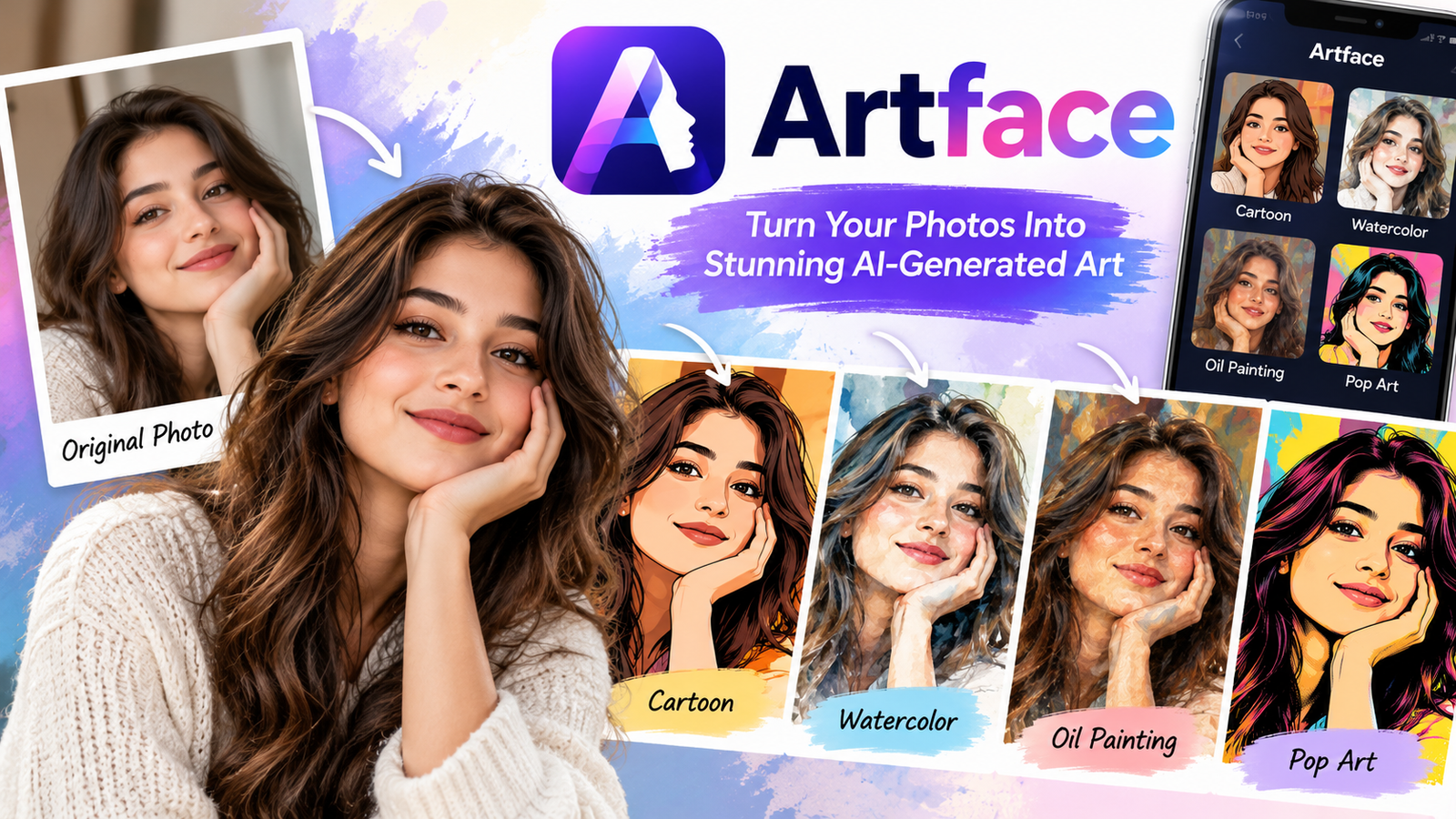
Artface is an AI-powered photo editing application that allows users to transform ordinary pictures into creative digital artwork. Whether you want to turn a selfie into a cartoon, create a painting-style portrait, or experiment with different artistic effects, Artface offers an easy way to explore digital creativity without professional editing skills.
Artificial intelligence has changed the way people edit and share photographs. Instead of spending hours adjusting colors, applying effects, and making detailed changes, users can now create artistic images with a few simple steps. Artface is part of this growing trend, making creative photo transformations accessible to people who enjoy photography, art, and social media.
One example is ArtFace Studio, an application developed by CUBOX AI. It provides several artistic styles, including cartoons, watercolor paintings, pop art, and oil painting effects. The app is designed for people who want to give their photographs a fresh appearance while keeping the editing process simple.
What Is Artface?
Artface is a name associated with AI-powered applications that turn photographs into artistic images. These tools use artificial intelligence to analyze uploaded pictures and recreate them in different visual styles. Rather than requiring users to draw or paint manually, the software generates an artistic version of the original photograph.
ArtFace Studio focuses on transforming selfies and portraits into digital artwork. Users can select an image, choose an artistic style, and allow the application to create a new version. The process is intended to be simple enough for beginners who have little experience with photo editing software.
The name Artface is also used by other applications that offer related features, such as AI avatars, face swapping, and creative portraits. Although these applications share a similar theme, they are not necessarily developed by the same company or designed for the same purpose.
For this article, the main focus is ArtFace Studio and the way AI-powered photo transformation tools help users create artistic images.
How Artface Turns Ordinary Photos Into Digital Art
The main idea behind Artface is to make artistic photo editing faster and easier. When a user uploads a photograph, the application uses artificial intelligence to generate a new image based on the selected art style.
For example, a normal selfie can be transformed into a colorful cartoon portrait or an image that resembles an oil painting. The application changes the visual presentation while attempting to preserve recognizable details from the original photograph.
The process begins with selecting a picture from the device’s gallery or taking a new selfie. After choosing an available artistic effect, the application processes the image and produces a transformed version that can be reviewed and saved.
The final result depends on several factors, including the quality of the original photograph, the selected style, and how well the AI interprets facial features. Clear images with good lighting usually give the software more useful visual information to work with.
Creative Features That Make Artface Interesting
Artface offers different ways to experiment with photographs. Instead of focusing only on traditional photo adjustments, ArtFace Studio is designed to recreate images in artistic styles that give ordinary portraits a different appearance.
AI-Powered Photo Transformation
One of the main features of ArtFace Studio is its ability to transform photographs using artificial intelligence. The application processes an existing image and creates an artistic interpretation based on the selected effect.
This can be useful for people who want to experiment with digital art but do not have the time or technical experience required to create illustrations manually. It also provides an opportunity to explore how the same photograph might look in several different styles.
Although AI can generate impressive results, the transformed image may not always preserve every facial detail accurately. Some styles intentionally change proportions, textures, and colors to create a stronger artistic effect.
Cartoon and Animated Portrait Styles
Cartoon portraits are among the artistic effects described in the ArtFace Studio app listing. These styles transform realistic photographs into illustrations with simplified features, smooth textures, and more expressive visual details.
A regular photograph can take on the appearance of a digital cartoon character, making it suitable for creative profile pictures and personal artwork. Users can experiment with different images to find a result that matches their preferred appearance.
Cartoon-style transformations are particularly useful when someone wants a playful alternative to a conventional photograph. However, they should be understood as creative interpretations rather than exact reproductions of the original image.
Watercolor Painting Effects
Watercolor is another artistic style supported by ArtFace Studio. This effect is intended to recreate some of the soft colors and painted textures associated with traditional watercolor artwork.
Unlike an ordinary photograph, a watercolor-style portrait may use blended colors and less sharply defined details. This can give the picture a softer appearance while creating the impression of a hand-painted image.
Such effects may appeal to users who prefer subtle artistic designs over bright cartoon illustrations. They can also be useful for personalized digital artwork and creative social media posts.
Oil Painting and Pop Art Styles
ArtFace Studio also describes oil painting and pop art among its available transformation options. These two styles offer noticeably different visual experiences.
Oil painting effects generally aim to recreate the textured appearance of traditional painted portraits. They may emphasize color transitions, brush-like details, and a more classical presentation.
Pop art takes a different approach by using expressive colors and bold visual elements. It can make an ordinary photograph appear more graphic and playful, especially when the selected effect emphasizes strong contrasts.
Having access to different styles allows users to explore several artistic directions without needing separate editing techniques for each one.
Simple Photo Editing Experience
ArtFace Studio is designed with accessibility in mind. Its App Store description presents the editing process as straightforward, allowing users to select a photograph and apply an available artistic effect.
This simplicity can be helpful for beginners who find advanced photo editing software difficult to use. Instead of working with multiple layers, complex adjustment panels, and detailed editing tools, users can focus on choosing the visual style they want.
However, simple editing applications may offer fewer manual controls than professional software. Users who need precise adjustments to individual image elements may still prefer a more advanced editing program.
How to Use Artface to Create AI Artwork
Creating artistic images with ArtFace Studio does not require advanced technical knowledge. The application is designed around a relatively straightforward process that begins with choosing a photograph and ends with saving the transformed result.
First, users need to install ArtFace Studio on a compatible device. After opening the application, they can select an existing photograph from their gallery or take a new selfie, depending on the options available.
Once the image has been selected, the next step is choosing an artistic style. Users can experiment with options such as cartoons, watercolor, pop art, or oil painting to see which effect best suits their photograph.
The application then processes the picture and generates an artistic version. After reviewing the result, users can save the image or share it through supported social media options.
For better results, it helps to begin with a clear photograph where the face is visible and the lighting is balanced. Images that are heavily blurred or contain complicated backgrounds may produce less predictable transformations.
Why People Use Artface for Creative Photos
People use AI-powered photo applications for different reasons. Some enjoy experimenting with visual styles, while others want to create distinctive profile pictures or personalized artwork.
Artface can be appealing because it makes artistic image creation more accessible. Someone who has never used professional design software can still explore different visual effects and create pictures that look noticeably different from the original photographs.
The application may also appeal to social media users who enjoy sharing creative images. A cartoon portrait or painting-style selfie can provide a different visual presentation compared with everyday photographs.
Another reason people explore such tools is curiosity. AI-generated images offer an opportunity to see how technology interprets familiar faces through different artistic styles.
However, the quality of the artwork can vary. Not every transformation will match a user’s expectations, and experimentation is often part of finding a satisfying result.
Artface for Social Media and Profile Pictures
Social media is one of the places where artistic photo transformations can be particularly useful. Profile pictures are often small, visually prominent images that represent a person across different platforms.
Artface allows users to create alternative versions of their photographs that may stand out from ordinary selfies. Cartoon portraits, painted effects, and colorful artistic styles can help create a more personalized appearance.
For example, someone who enjoys illustration may prefer a cartoon-style profile picture, while a person interested in traditional art might choose an oil painting effect.
Creative portraits may also be used in personal posts, online albums, or digital artwork collections. ArtFace Studio’s App Store description includes options for sharing transformed images through social media platforms.
For professional profiles, however, users should consider whether an artistic image is appropriate. A realistic photograph may be more suitable when accurate identification and a formal presentation are important.
Is Artface Free to Use?
ArtFace Studio is listed as a free application on Apple’s App Store, but it also offers in-app purchases. This means users can download the application without an initial purchase, although some features or services may require payment.
The availability of free effects, additional styles, and paid options can change as developers update an application. Users should therefore review the current pricing information before subscribing or purchasing additional features.
It is also important to distinguish ArtFace Studio from other applications using the Artface name. Different apps may have different pricing models, subscription terms, and creative tools.
Before paying for any AI photo editing service, checking whether the available features meet your needs can help avoid unnecessary purchases.
Is Artface Safe for Your Photos?
Photo privacy is an important consideration when using artificial intelligence applications, especially those that process facial images. A selfie can contain personal information, including recognizable facial features and details about a person’s surroundings.
The ArtFace Studio App Store description states that the application follows privacy guidelines and does not store or access photographs without permission. However, users should still examine the application’s current privacy policy and the data practices disclosed in its store listing.
It is also worth remembering that applications using similar names may operate under completely different privacy policies. A privacy statement published by one Artface developer should not be assumed to apply to another.
Before uploading personal photographs, users should understand how their images may be processed, whether they are stored, and what permissions the application requires.
People should also avoid uploading sensitive photographs or images of others without their permission. Being careful about personal data is an important part of using AI-powered creative tools responsibly.
Artface vs Traditional Photo Editing Apps
Artface differs from traditional photo editing software because its main purpose is artistic transformation rather than detailed manual editing.
Conventional photo editors often allow users to adjust brightness, contrast, sharpness, colors, and other image properties. More advanced applications may provide layers, masking, and selective adjustments that give experienced editors precise control over the final result.
ArtFace Studio takes a simpler approach by allowing users to choose an artistic style and generate a transformed image automatically. This can reduce the amount of time and technical knowledge needed to explore different visual effects.
However, automatic transformations may provide less control over individual details. Users looking for precise professional editing may prefer conventional tools, while those interested in quick creative artwork may find AI transformation apps more convenient.
Neither approach is necessarily better for every situation. The most suitable option depends on whether the goal is accurate photo editing or artistic experimentation.
Limitations of AI Art Generators Like Artface
Although AI-generated artwork can be visually interesting, the technology has limitations. One common challenge is that transformed images may contain details that differ from the original photograph.
For example, an AI effect might slightly change facial proportions, alter small features, or simplify details that were clearly visible in the original picture. These changes may be acceptable in creative artwork but less suitable when accuracy is important.
Another limitation is that users may have restricted control over how an effect is applied. Automated styles can be convenient, but they do not always produce the exact appearance a person has in mind.
Image quality also depends on the photograph being processed. Poor lighting, low resolution, and unclear facial details can affect the final result.
There are privacy considerations as well. Users should review how an application handles photographs and personal information before uploading images, particularly when using an unfamiliar service.
Tips for Getting Better Results With Artface
A good starting photograph can make a noticeable difference when creating AI-generated artwork. Clear facial features, balanced lighting, and a simple background give the application more useful information to interpret.
Natural lighting is often a practical choice because it helps reduce harsh shadows and makes facial details easier to recognize. A photograph taken near a window during daylight may work better than one captured in a dark room.
It is also helpful to experiment with different artistic styles. A photograph that looks appealing as a watercolor painting may not produce the same result as a cartoon or pop art image.
Users should review the generated artwork carefully before sharing it, especially if the AI has changed important details. Trying another photo or selecting a different style may lead to a more satisfying result.
The most important part of using Artface is experimentation. Different photographs and artistic effects can produce a wide range of results, allowing users to develop their own creative preferences.
Who Should Try Artface?
Artface may appeal to people who enjoy photography, digital artwork, and creative image editing. Its straightforward approach makes it particularly relevant to beginners who want to explore AI-generated portraits without learning complex software.
Social media users may appreciate the ability to create alternative profile pictures, while art enthusiasts may enjoy experimenting with painting-inspired visual styles.
It can also be an entertaining tool for people who want to transform personal photographs into something unusual. A familiar selfie can become a colorful illustration or painted portrait, offering a different way to express creativity.
However, users who require professional-level image accuracy or detailed manual editing may find the application’s automatic approach limiting. Artface is better understood as a creative transformation tool than a complete replacement for advanced editing software.
Final Thoughts
Artface offers a simple and creative approach to transforming ordinary photographs into digital artwork. By using artificial intelligence, ArtFace Studio allows users to explore artistic styles such as cartoons, watercolor paintings, pop art, and oil painting effects without needing advanced editing skills.
The application can be useful for people who enjoy experimenting with selfies, creating personalized profile pictures, or exploring different forms of digital art. Its easy-to-use approach makes creative photo transformations more accessible, although the final results can vary depending on the original image and selected style.
As AI-powered editing tools continue to develop, applications like Artface show how technology can provide new opportunities for everyday creativity. Whether someone wants to create a playful cartoon portrait or a painting-inspired image, Artface offers a convenient way to experiment with photographs and discover different artistic possibilities.

-
 Blog6 days ago
Incfidelibus: Meaning, Definition, Origins & History
-
 Blog6 days ago
Antarvafna: Meaning, Origins and Context
-

 How to6 days ago
Babeltee: The New Healthy Tea Trend Explained
-

 Entertainment4 days ago
What Is 1TamilBlaster? Movie Downloads, Risks, and Legal Alternatives
-

 Health6 days ago
Cellulogia: What It Means for Cellulite Care
-

 Technology7 hours ago
Zexpo: What It Is, How It Works, Features, and Benefits